The Problem

Modern task management tools often fail in two key areas:

User-level problems

Small businesses or startups

⤷ Users struggle to prioritize tasks

⤷ Planning work across time feels manual and fragmented

⤷ Important tasks get buried in long task lists

⤷ Conversations and tasks live separately

Organization-level problems

For growing businesses

⤷ Missed deadlines due to poor time allocation

⤷ Low visibility into task risk and progress

⤷ Time wasted on manual planning and follow-ups

⤷ Inefficient handoff between communication & execution

Despite using task tools, users still rely heavily on mental planning and guesswork.

Design Goal

The goal of Tasky was to:

Reduce planning friction

Improve task clarity and prioritization

Convert conversations into action

Introduce AI in a supportive, transparent way

Maintain a clean, non-intrusive UI

Design principle

AI should assist decision-making,
not replace human judgment.

Why AI (and Why Carefully)

BEFORE AI

Instead of asking “Where can AI be added?”, I asked:

1.) Reduce planning friction

2.) Where do users feel uncertain?

3.) Where does context switching break flow?

AFTER AI

AI was introduced at moments of friction, such as:

1.) Deciding what to do next

2.) Scheduling tasks

3.) Understanding task risk

4.) Extracting action items from conversations

Key AI Use Cases & Impact

I followed a modular, iterative approach - balancing technical feasibility with user intuition.

01

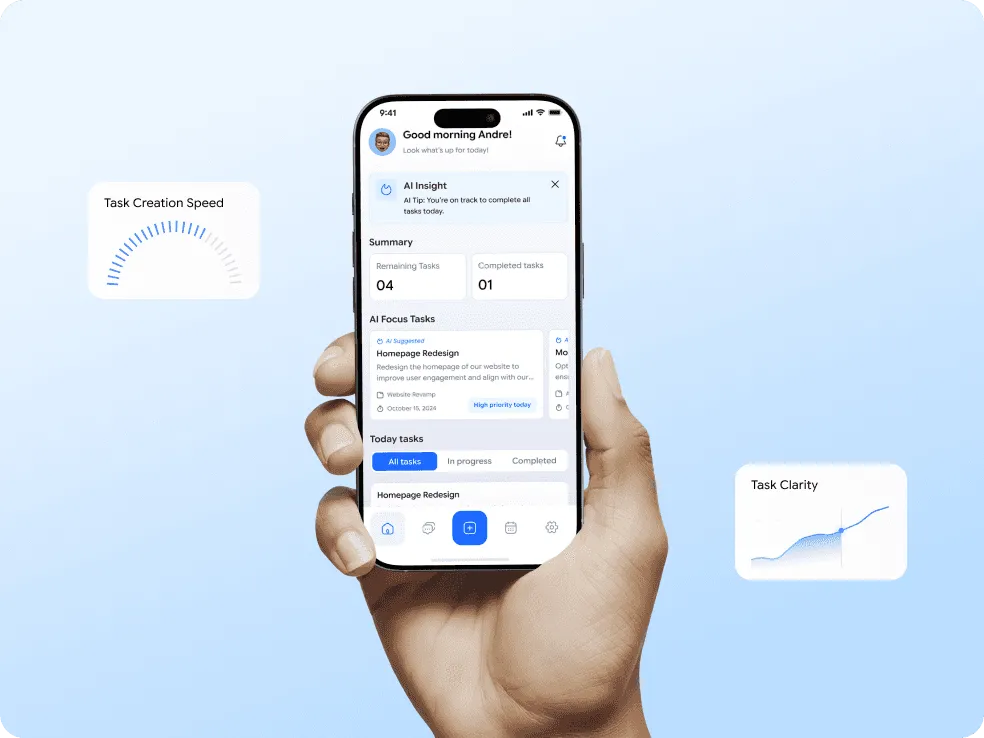
AI Focus Tasks (Dashboard)

What it does?

⤷ Highlights high-priority tasks based on deadline, progress, and workload

⤷ Explains why a task is important

User Benefit

⤷ Reduces decision fatigue

⤷ Helps users start their day with clarity

Impact

~30% reduction in time spent deciding “what to work on next”

Faster task start time

Card Image
Card Image
Card Image

02

AI-Assisted Task Creation

What it does?

⤷ Allows users to create tasks manually or with AI

⤷ AI helps generate task title, description, and sub-tasks

⤷ User can edit everything before saving

User Benefit

⤷ Faster task creation

⤷ Clearer task definitions

Impact

~40% faster task creation

Fewer incomplete or vague tasks

Card Image
Card Image
Card Image
Card Image

03

AI Task Risk & Progress Insights

What it does?

⤷ Predicts if a task may need extra time

⤷ Suggests progress updates

⤷ Surfaces insights directly inside task details

User Benefit

⤷ Early awareness of delays

⤷ Better planning and expectation setting

Impact

Less Missed deadlines

More proactive task updates

Card Image
Card Image
Card Image

04

AI Conversation Insights (Messages)

What it does?

⤷ Detects task-related discussions

⤷ Summarizes conversations

⤷ Allows creating tasks directly from chat

User Benefit

⤷ No more “lost” action items

⤷ Faster transition from discussion to execution

Impact

Less Context switching between chat and tasks

More Accountability and follow-through

Card Image
Card Image
Card Image
Card Image
Card Image

05

AI Schedule Optimization

What it does?

⤷ Detects overlapping tasks

⤷ Suggests optimized time slots

⤷ Helps plan future work visually using calendar view

User Benefit

⤷ Better time allocation

⤷ Less over-scheduling

Impact

Less schedule conflicts

Increased On-time task completion rate

Card Image
Card Image
Card Image
Card Image

06

AI Transparency & Control (Settings)

What it does?

⤷ Allows users to toggle AI features

⤷ Clearly communicates data privacy

User Benefit

⤷ Trust and control

⤷ Confidence in using AI features

Impact

User trust increased

Less AI fatigue or resistance

Card Image
Card Image

User Impact Summary

A modular, role-driven enterprise dashboard that unifies data, tasks, and governance - with zero friction.

↓ 35%

Task planning time

Faster prioritization with AI-guided focus tasks.

↑ 40%

Task creation speed

Less manual effort through AI-generated task details.

↓ 25%

Missed deadlines

Smarter scheduling and early delay alerts.

↓ 30%

Context switching

Seamless transition from chat to task.

↑ Significantly

Task clarity

Better-defined tasks with AI support.

Organizational Impact

For teams and organizations, Tasky enables:

⤷ Better visibility into task risk
⤷ Improved deadline predictability
⤷ Faster alignment between communication and execution
⤷ Reduced manual follow-ups

ESTIMATED TEAM LEVEL IMPACT:

1,200+

ACTIVE TEAMS SUPPORTED

Scaling task planning and execution across cross-functional teams.

↓ 30%

OPERATIONAL OVERHEAD

Less time spent on manual planning, tracking, and follow-ups.

↑ 25%

DELIVERY RELIABILITY

More predictable timelines through AI-assisted planning and insights.

UX Decisions & Trade-offs

What I intentionally avoided

⤷ Over-automation
⤷ Forcing AI usage
⤷ Hidden AI decision-making
⤷ AI chatbots replacing workflows

Key trade-offs

⤷ AI suggestions are optional
⤷ Manual control is always available
⤷ AI explains why it suggests something

Final Outcome

Tasky demonstrates how AI can be embedded into productivity tools in a calm, human-centered way.

Instead of adding complexity, AI helps users:

The result is a task management experience that feels smarter without feeling overwhelming.

Key Takeaway

Good AI design isn’t about automation - it’s about augmentation.

Tasky explores how thoughtful AI integration can enhance productivity while respecting user control and clarity.

Have a project idea in mind? Let’s Build Your Enterprise System From legacy chaos to scalable, role-smart platforms - I deliver impact.

Create a free website with Framer, the website builder loved by startups, designers and agencies.